Specification
System Architecture
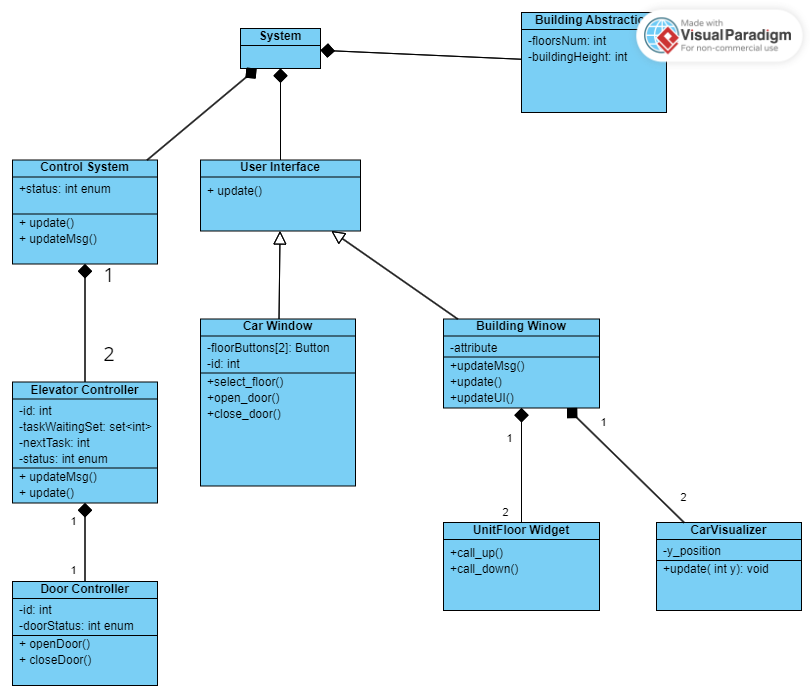
Software Specifictions
S1: Floors Window Specification
The Floors Window of the software: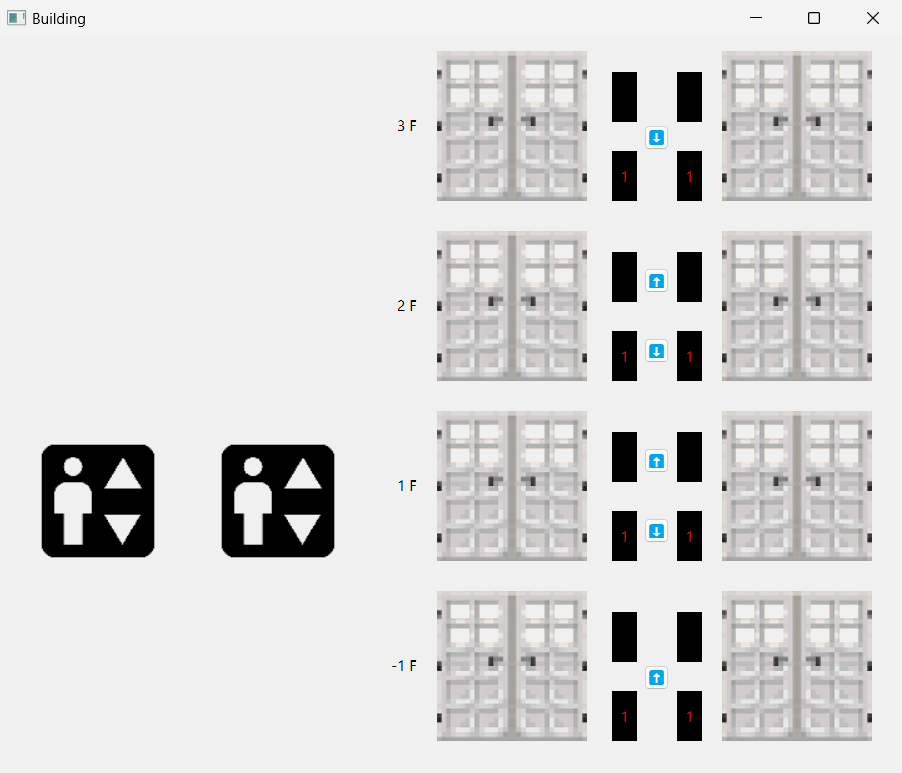
The typical working flow of the elevator system: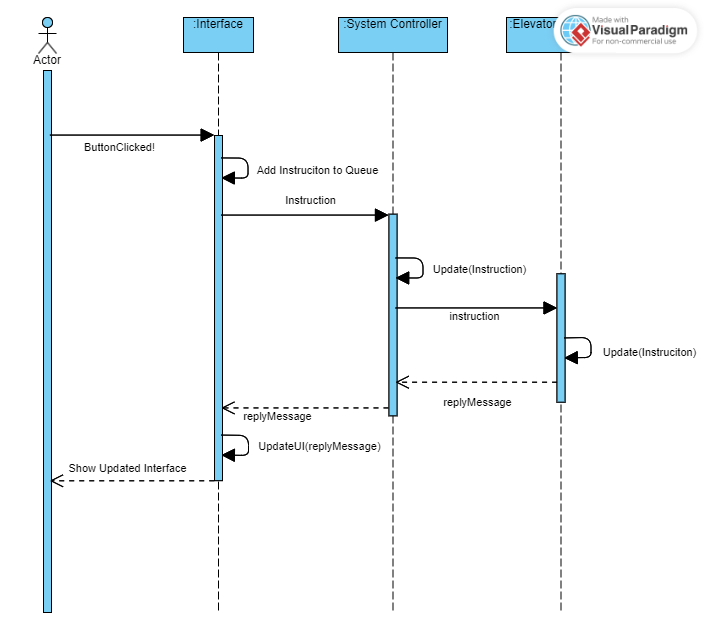
S1.1 Initialize
The position of each elevator will be initialized on the height of first floor. The status of each elevator is IDLE, next task is -2, the task waitingset is an empty set, and timer is set to 0.
S1.2 Call Up
- Push Up Button to call up.
- UI send instruction to System Controller, The botton is “enlighted” by setting to disabled.
- The Dispatcher of the elevator system controller will arrange a nearest elevator considering elevator direction and add the floor of hall call to the task waiting set of the elevator.
- If Elevator is in
IDLEstatus with non-empty task waitingset, a task of least distance considering direction will be popped out from the waitingset and be set as the next task.Then the elevator tranfer to stateSTOPPEDand give an output. output = 1 for stopping at this floor and output = 3 for stoping at other floors.
S1.3 Call Down
Push Up Button to call down.
UI send instruction to System Controller, The botton is “enlighted” by setting to disabled.
The Dispatcher of the elevator system controller will arrange a nearest elevator considering elevator direction and add the floor of hall call to the task waiting set of the elevator.
If Elevator is in
IDLEstatus with non-empty task waitingset, a task of least distance considering direction will be popped out from the waitingset and be set as the next task.Then the elevator tranfer to stateSTOPPEDand give an output. output = 1 for stopping at this floor and output = 3 for stoping at other floors.
S1.4 Elevator Move Up
Elevator Control: In each update period, If the elevator arrives at some floor, it check whether this floor is in its task waiting set or it is the elevator’s next task. If so, the elevator controller referesh the task settings by popping an item as the next task or removing it and enter
STOPPEDstatus with output=1.Interface: In each update period, the car visualizer use
movemethod to move up and down according to the position provided in Control System’s reply message. Update the floor & direction indicators according to reply messages.
S1.5 Elevator Move Down
Elevator Control: In each update period, If the elevator arrives at some floor, it check whether this floor is in its task waiting set or it is the elevator’s next task. If so, the elevator controller referesh the task settings by popping an item as the next task or removing it and enter
STOPPEDstatus with output=1.Interface: In each update period, the car visualizer use
movemethod to move up and down according to the position provided in Control System’s reply message. Update the floor & direction indicators according to reply messages.
S1.6 Elevator Arrives at Target Floor
Elevator Control: Now it enters
STOPPEDstatus. Upon entering, it send updating messages (DOOR_OPEN#id) to Interface interchanging the system control. In each updating period during stopping, the timer ticks by 1.Interface: open the corresponding door according to the updating messages. Set related hall calls unlighten by turning it enable. Update the floor & direction indicators according to reply messages.
S1.7 Elevator Leaves at Target Floor
Elevator Control: Now it prepares leaves
STOPPEDstatus when timer is more than stop duration. it send updating messages (DOOR_CLOSED#id) to Interface interchanging the system control. and the timer ticks 1. When timer is more than stop duration + door duration, select new task, enterUPorDOWNorIDLEstate according to task conditions.Interface: open the corresponding door according to the updating messages. Set related hall calls unlighten by turning it enable. Update the floor & direction indicators according to reply messages.
S2: Car Window Specification
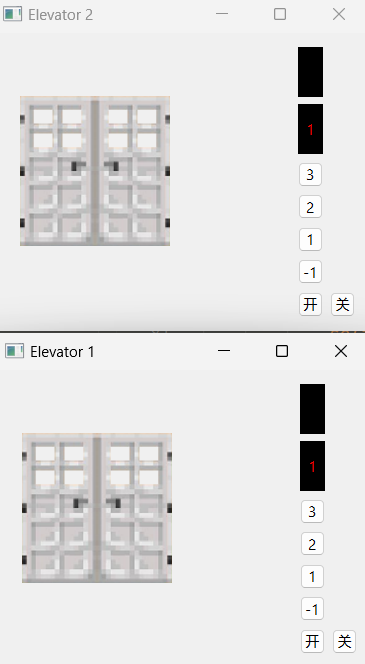
The updating of indicators and doors are consistent with that in Floor Window. So we focus on Floor Selection and door operations:
S2.1 Select Floors
Push a floor button to select floor.
UI send instruction to elevator Controller interchanging system controller, The botton is “enlighted” by setting to disabled.
The elevator controller will add selected floor if it is not the next task or in the waitingset.
If Elevator is in
IDLEstatus with non-empty task waitingset, a task of least distance considering direction will be popped out from the waitingset and be set as the next task.Then the elevator tranfer to stateSTOPPEDand give an output. output = 1 for stopping at this floor and output = 3 for stoping at other floors. Otherwise, it execute determined routine.
S2.2 Open Doors
Push Open Button (“开”) to open the door, the door will only open when elevator is in
IDLEorSTOPPEDstatus.UI send instruction to elevator Controller interchanging system controller.
The elevator controller set timer to 0 and door controller will open the door if the elevator is in in
IDLEorSTOPPEDstatus. The elevator controller also send updating messages (DOOR_OPEN#id).Interface: open the corresponding door according to the updating messages. Update the floor & direction indicators according to reply messages.
S2.2 Close Doors
Push close Button (关”) to close the door, the door will only close when elevator is in
IDLEorSTOPPEDstatus.UI send instruction to elevator Controller interchanging system controller.
The elevator controller set timer to stop duration + 1 and door controller will close the door if the elevator is in in
IDLEorSTOPPEDstatus. In case this The elevator controller also send updating messages (DOOR_CLOSED#id).Interface: close the corresponding door according to the updating messages. Update the floor & direction indicators according to reply messages.

Ikagnaw
你我狂想畅谈间,将所愿世界构建